Documentation
Run a check
Check your whole website or one page whenever you change something, see which checks count toward your 10 a month, and follow or cancel a running check.
Updated October 23, 2026
allyWay checks your website automatically, but you can also start a check yourself – for example after you changed something. This page shows how, which checks count and how to follow or cancel a check.
Before you start
- A plan. During the free trial your website is checked automatically, and the Report has no Check now – see "During the free trial" below.
- The right website selected at the top of the left menu.
- You can start 10 checks per website each month.
Check your whole website
Open the Report
In the left menu, click Report.
Click Check now
Check now at the top right checks your whole website.
Confirm the check
If the check reads more than 20 pages, the window "Check your whole website?" says how many and about how long, for example "This check reads the next 688 pages of shop.com and takes about 57 minutes." and "It uses one of the 7 checks you have left this month." Click Start check – or Not now to start nothing. A smaller website is checked without asking.
Wait for the results
While the check waits or runs, the button says Checking… and the Report shows gray placeholders. You can leave the page. When it's done, everything updates at once, with a message like "Check complete – 3 new issues, 12 fixed by AI." or "Check complete. Nothing new found."
Check one page
Open the menu next to Check now
Click the arrow next to Check now.
Enter the page
Under Check one page, type a page of your website – for example
/contact,shop.com/contactor the full address.Click Check
The check starts right away and is usually ready in under a minute.
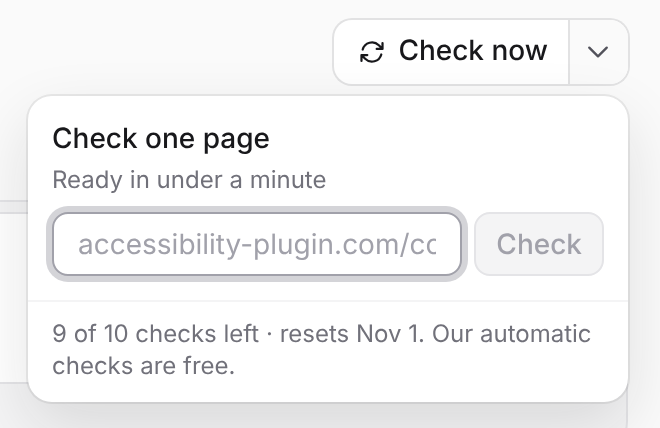
Use Check one page to test a page you just changed, or a page our check skips on its own, like a cart page. For a single change, I fixed this next to its place is free: in To fix, click View, then See every place and its guide.
Which checks count
You can start 10 checks per website per calendar month – Check now and Check one page each count as one. These don't count: automatic checks, each website's first check after you add it, and the re-checks of I fixed this and Mark as done. A check that fails, or that you cancel, is given back.
The count starts again on the 1st of every month at 00:00 UTC. You see what's left under Check one page ("7 of 10 checks left · resets Nov 1. Our automatic checks are free.") and in Settings ("Checks this month: 3 of 10").
Used them all? Automatic checks keep running for free, and I fixed this and Mark as done still work. You can't buy more checks, but you can switch automatic checks to Daily – see Set up automatic checks.
How long a check takes
One page is usually ready in under a minute. A whole website depends on how many pages the check reads and how fast your website answers. While it runs, the Overview shows how far it is, for example "12 of 50 pages checked" and "About 3 min left". If all checks are busy, it says "Waiting to start" – your check keeps its place.
Every check has a time limit: for a website, 2 minutes plus 15 seconds per page, at least 5 and at most 60 minutes. If the time runs out after your homepage was checked, the check ends with the pages it read, and those results count. On a bigger website, each check carries on where the last ones left off – "the next 688 pages".
Cancel a check
Click Cancel next to Checking… on the Report. The check stops right away, nothing of it is saved, and you see your last results again – "Check canceled." Your website's first check can't be canceled, and a check that is already saving its results says "This check is almost done – its results are being saved."
During the free trial
Your website is checked right after you add it and then automatically every week. If a check failed, the card on the Report shows the reason and Try again; before the first check, Check my website starts it. Both count like a check you start yourself. To check a change you made, open the issue, click Start fixing and use I fixed this – free.
Troubleshooting
- "You’ve used all checks of this website for this month. New checks on Dec 1." Wait for the new month – automatic checks continue meanwhile.
- "A check of this website is already running. You can start a new one when it has finished." Only one check per website can wait or run at a time. Wait, or click Cancel.
- "Too many failed checks today. Please try again tomorrow." After 10 checks a day that failed or were canceled, Check now pauses until the next day (UTC). Fix the reason shown under the Report's numbers first.
- "Checks need an active plan. Choose a plan to continue." Your trial or plan isn't active.
- "This website is paused because it isn’t in your plan. Add it to your plan to check it again." See Paused websites.
- "Enter a page of shop.com." The address under Check one page isn't a page of this website.
Is my website checked after I add it?
Yes. allyWay starts its first check right away, for free – it doesn't count as one of your checks. Until allyWay is detected on your website, a check reads at most 50 pages.
Can I close my browser while a check runs?
Yes. The check runs on our servers, and the results are waiting when you come back.