Documentation
Set up automatic checks
Let allyWay check your website every week or every day at night, for free – choose how often, see when the checks run, or switch them off.
Updated October 23, 2026
allyWay checks every website by itself at night – every week by default, or every day if you choose. Automatic checks are free and don't count toward the 10 checks you can start yourself each month. This page shows how to set them up.
Before you start
- A running trial or an active plan. Without one, no automatic checks run.
- The website selected at the top of the left menu. The setting is per website.
Choose how often your website is checked
Open Settings
On the Report or the Overview, click Settings at the top right.
Turn on automatic checks
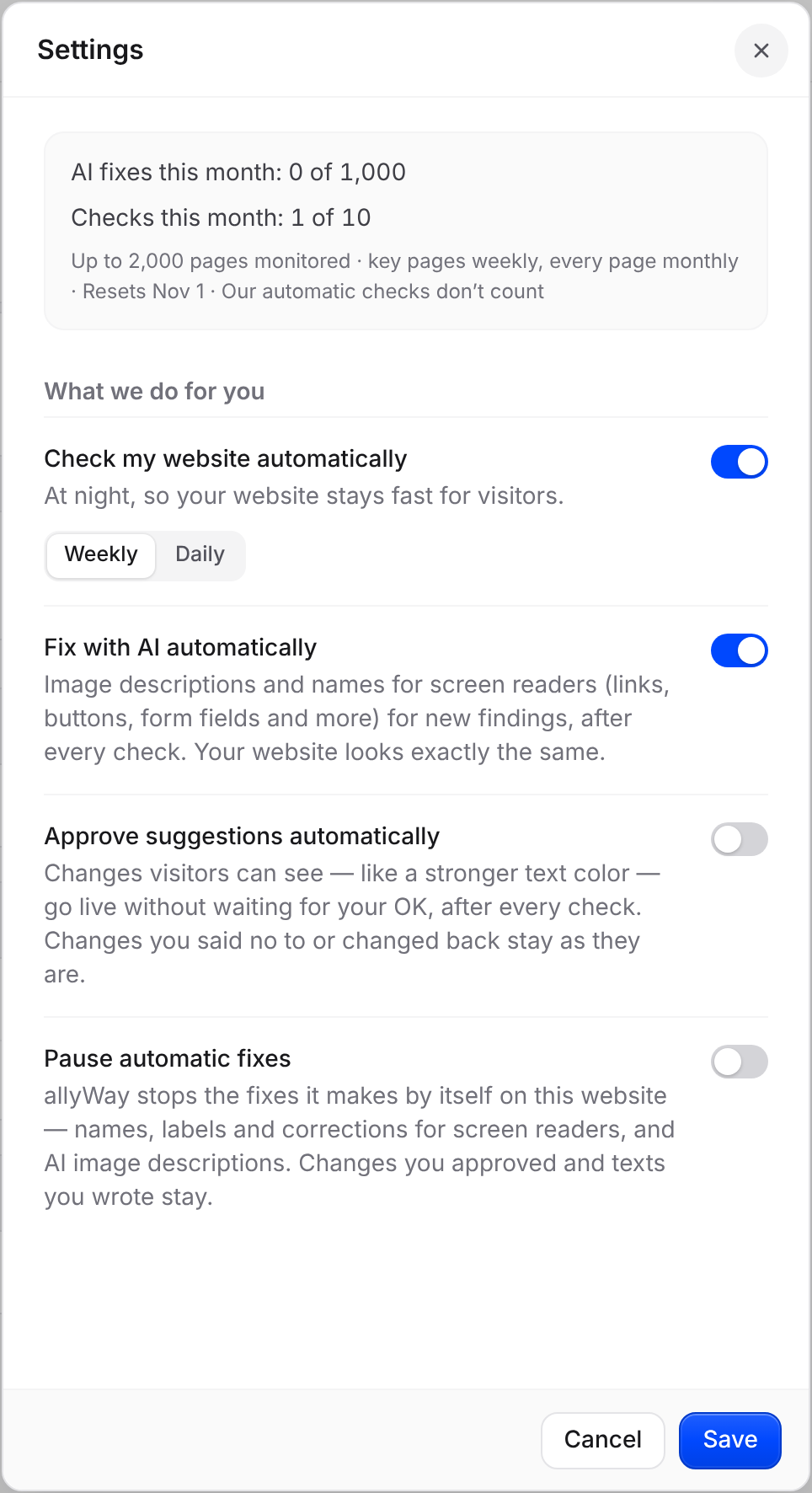
Under What we do for you, turn on Check my website automatically – "At night, so your website stays fast for visitors." To stop automatic checks, turn it off.
Choose Weekly or Daily
Below the switch, choose Weekly or Daily.
Save
Click Save. You see "Settings saved". Cancel closes the panel without changing anything.
Weekly or daily?
Both are free, and both cover every page we monitor within about 4 weeks.
- Weekly reads a larger part of your website once a week. It suits most websites.
- Daily reads a smaller part every night, so your homepage and your newest changes are checked every night. It suits websites that change every day, like news sites or shops with new products.
For example, a plan for 1 website reads up to 550 pages per weekly check and up to 79 per daily check. A small website that fits into one check is read completely either way. Check now isn't smaller with Daily – it always reads as many pages as a weekly check.
When automatic checks run
Automatic checks start between 01:00 and 05:00 UTC, at a time allyWay sets for each website so that not all websites start at once, and they end by 06:00 UTC. Weekly checks always come on the same weekday. You can't choose the day or time.
UTC is world time. In Central Europe that's 02:00–07:00 (03:00–08:00 in summer time); on the US East Coast it's the evening before, about 20:00–01:00 (21:00–02:00 in summer time).
A website you add gets its first automatic check the night after you add it. On bigger websites, a week's pages can be spread over several nights.
What automatic checks do
- They read your pages the same way as a check you start: only reading, never changing anything. See How our check visits your website.
- With a plan and Fix with AI automatically turned on, the AI fixes new findings after each check. The free trial has no fixes.
- They're skipped while another check of the website waits or runs, while the website is paused, and without a running trial or active plan.
When a check runs out of time
The check still counts: it ends with the pages it managed to read, and only those pages update your results. An automatic check that reaches the end of the night continues with the remaining pages the next night. The History tab shows how many pages each check read, for example "Whole website · 312 pages".
Check that it works
The Overview shows "Monitoring active · Next scan Tue, Oct 20" with the date of the next check, in your browser's time zone. With automatic checks off, it says "Automatic checks are off". On the Report, History lists automatic checks as "Automatic".
The other settings in the panel
The box at the top shows this website's usage, for example "AI fixes this month: 120 of 1,000", "Checks this month: 3 of 10" and "Up to 2,000 pages monitored · key pages weekly, every page monthly". Below Check my website automatically, the panel has the switches for allyWay's fixes: Fix with AI automatically (on by default), Approve suggestions automatically (off until you turn it on) and Pause automatic fixes. During the free trial it shows only the automatic checks, as allyWay's fixes come with a plan. More in How AI fixes work.
Troubleshooting
- "Settings could not be saved. Please try again." Try again in a moment. If it keeps happening, reload the page.
- No new results after a night Check that Check my website automatically is on and that the website isn't paused. A check that is still running when the next one is due skips it.
Do automatic checks cost anything?
No. They're included in the trial and every plan and never count toward your 10 checks a month.
Can I choose when my website is checked?
Not at the moment. allyWay sets a fixed time slot for each website between 01:00 and 05:00 UTC.
What happens without automatic checks?
New problems are only found when you check yourself with Check now, and Fix with AI automatically only runs after the checks you start. See Run a check.